

In the world of streaming and direct-to-consumer platforms, speed and accuracy matter. Whether you're onboarding VIP subscribers, migrating legacy users, running a marketing campaign, or reconciling subscription states, manual workflows can quickly become a bottleneck.
That’s why the Consumer Subscription Wizard was built.
This lightweight, single-page application simplifies the entire lifecycle of creating Zype consumers and provisioning subscriptions — all within a guided, operator-friendly workflow.
What Is the Consumer Subscription Wizard?
The Consumer Subscription Wizard is a browser-based tool that streamlines bulk onboarding and subscription assignment using the Zype Admin API.
It guides operators through:
- API credential validation
- Plan discovery and selection
- Email ingestion and validation
- Consumer creation or update
- Subscription provisioning and reconciliation
- Results logging and CSV export
Instead of writing custom scripts or manually executing API calls, operators get a structured, safe, and transparent experience.
GitHub Repository:
zype-samples/bulk-consumer-subscription-wizard
Sample Steps to Bulk Add/Update VIP Subscription Status
Why This Tool Matters
Bulk user provisioning often introduces risk:
- Duplicate consumers
- Expired subscriptions not reconciled
- Failed batches due to existing plan conflicts
- Email formatting errors
- Lack of logging or audit trail
The Consumer Subscription Wizard addresses each of these with built-in safeguards and intelligent automation.
Key Features
1) Guided 5-Step Wizard Interface
The wizard uses a visual stepper with live validation to keep operators oriented and prevent common mistakes.
Each step builds on the previous one:
- Credentials must validate before plans load
- Plans must be selected before subscription-dependent options activate
- Email limits are enforced before processing begins
This reduces operational risk and ensures clean execution.
2) Dynamic Plan Discovery
Using the Zype Plans API, the tool dynamically fetches available subscription plans.
Features include:
- Automatic plan loading
- Contextual summaries
- A built-in “Skip Plan” card for consumer-only runs
- Smart enable/disable logic tied to plan selection
This eliminates hardcoded plan IDs and ensures operators are always working with current configurations.
3) Flexible Processing Modes
Operators can choose how they want to run the batch:
- Create Only – Adds new consumers
- Update Only – Updates existing consumers
- Create & Update – Hybrid mode for mixed datasets
Plan-dependent options remain disabled until a plan is selected, preventing accidental misconfiguration.
4) Intelligent Email Ingestion Safeguards
Bulk operations are only as clean as the input data.
The wizard automatically:
- Trims whitespace
- Deduplicates (case-insensitive)
- Validates email format
- Tracks a live 0 / 100 counter
- Enforces a strict 100-email batch limit
This ensures clean API calls and predictable outcomes.
5) Automated Consumer Lifecycle Handling
Instead of failing when an email already exists, the wizard:
- Checks for existing consumers
- Reuses existing consumer IDs
- Creates new consumers when needed
- Proceeds intelligently based on processing mode
This allows true reconciliation — not just blind creation.
6) Subscription Reconciliation (Not Just Creation)
If a consumer already has the selected plan:
- The wizard updates the subscription instead of failing the batch
- Expiration timestamps are recalculated
- Assigned day counts are recorded in results
This is critical for:
- VIP extensions
- Promotional renewals
- Reactivation campaigns
- Subscription migrations
7) Real-Time Processing Console
During execution, Step 4 displays a scrolling log that shows:
- Consumer created
- Consumer reused
- Subscription created
- Subscription updated
- API errors
- Validation warnings
Operators get immediate transparency into what’s happening.
8) Real-Time Processing Console
Step 5 presents a structured summary table that highlights:
- Success
- Warning
- Failure
Additionally, operators can download a CSV that includes:
- Email address
- Consumer ID
- Subscription ID
- Assigned duration (days)
- Status message
Perfect for:
- Audit records
- Reporting
- CRM reconciliation
- Support documentation
API Endpoints Utilized
The wizard integrates directly with the Zype Admin API:
- List Plans
- Create Consumer
- List Consumers
- Create Subscription
- List Subscriptions
- Update Subscription
This makes it a practical reference implementation for anyone building against the Zype API.
Technical Structure
The project is intentionally lightweight and modular:
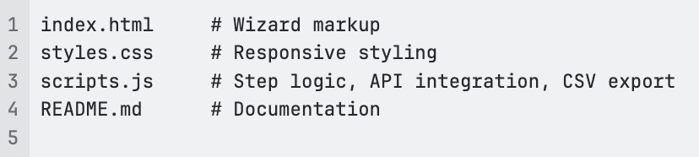
The page is optimized down to roughly 440px width, making it usable even on smaller screens.
Prerequisites
Before using the tool, you’ll need:
- A valid Zype Admin API Key
- Permissions to:
- List plans
- Create consumers
- Manage subscriptions
- A modern desktop browser with JavaScript enabled
Security Note: API keys are stored only in memory and cleared upon refresh or reset.
Step-by-Step Usage
- Open
index.htmlin your browser. - Enter your Admin API key to load plans.
- Select a plan (or choose “Skip plan”).
- Choose subscription duration if applicable.
- Select processing mode.
- Paste up to 100 comma- or newline-separated emails.
- Confirm and run.
- Monitor live processing.
- Download CSV or reset.
Built-In Safeguards
The wizard enforces:
- 100-email batch limit
- Plan dependency validation
- Email formatting checks
- Subscription duration calculations
- Clear error reporting in both console and summary
Error states are never silent. Every API failure, duplication issue, or subscription conflict is surfaced.
Use Cases
This tool is ideal for:
- VIP access provisioning
- Marketing campaign redemptions
- Bulk subscription migrations
- Manual CSR operations
- Account recovery campaigns
- Beta tester onboarding
- Sports event pass activation
- Limited-time promotional extensions
For teams managing sports streaming, FAST-channel upsells, or direct-to-consumer subscription bundles, this wizard dramatically reduces manual effort and API scripting overhead.
Use Cases
If you’re already working in the Zype ecosystem — especially in operational or solution-engineering roles — this tool demonstrates how to:
- Orchestrate multiple API endpoints cleanly
- Build guardrails around bulk operations
- Implement reconciliation logic
- Deliver operator-friendly UX around backend workflows
It’s not just a provisioning tool.
It’s a practical blueprint for API-driven workflow design.
Final Thoughts
The Consumer Subscription Wizard transforms what used to be a fragile, manual, multi-step API process into a guided, validated, and transparent experience.
For teams managing subscriber growth, lifecycle extensions, or migration workflows, this tool reduces risk, increases efficiency, and provides full operational visibility.
If you’re working with Zype and need scalable subscription provisioning, this is a smart place to start.
To see examples of this click here.