

WordPress gives publishers a flexible foundation for building websites, managing editorial content, and reaching audiences online. But delivering a complete streaming destination requires more than placing a basic video player on a page.
Media teams also need practical ways to organize and publish large video libraries, manage playlists, support live and linear programming, authenticate viewers, deliver entitled content, monetize premium programming, expose structured metadata, and maintain control over the presentation of every viewing experience.
The Zype WordPress Plugin brings these capabilities together by connecting a WordPress website to the Zype Streaming Platform. It gives publishers, administrators, and developers a practical integration layer for managing streaming operations in WordPress while keeping privileged platform credentials and API activity securely on the server.
The result is a more connected workflow for organizations that want WordPress to serve as the front end of an owned-and-operated video destination.
Connect WordPress to Your Zype Video Library
Once the plugin is configured with the appropriate Zype credentials, authorized WordPress administrators can access a broad set of video operations through a dedicated Zype menu.
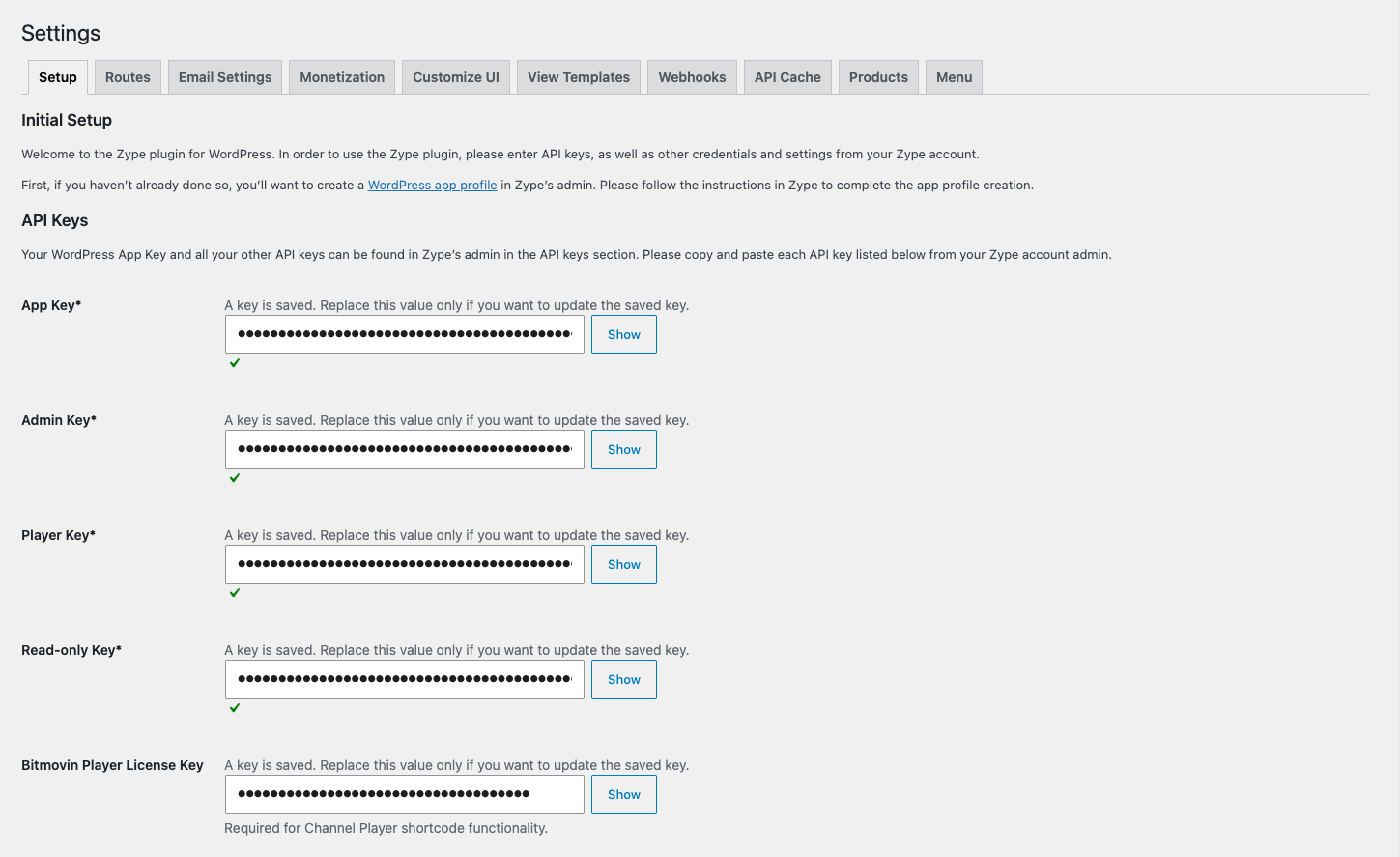
Instead of moving between disconnected tools for everyday publishing tasks, teams can search videos and playlists, copy shortcodes, upload media, manage Channels, review consumers, work with metadata objects, configure product experiences, manage cloud encoders, and oversee live or linear events from the familiar WordPress dashboard.
The plugin uses Zype APIs to retrieve content when it is needed. Videos, consumers, playlists, and ZObject records remain managed in Zype rather than being unnecessarily duplicated as WordPress content records. WordPress stores the plugin-owned configuration needed to shape the website experience, including route settings, Channel definitions, View Template metadata, interface preferences, and related integration settings.
This separation helps publishers maintain Zype as the source of truth for their streaming catalog and audience data while using WordPress to control presentation, navigation, and editorial workflow.
Publish Complete Video Experiences With Shortcodes
Shortcodes make it easier for editors to place Zype-powered experiences into WordPress pages and posts without building a custom integration for every content type.
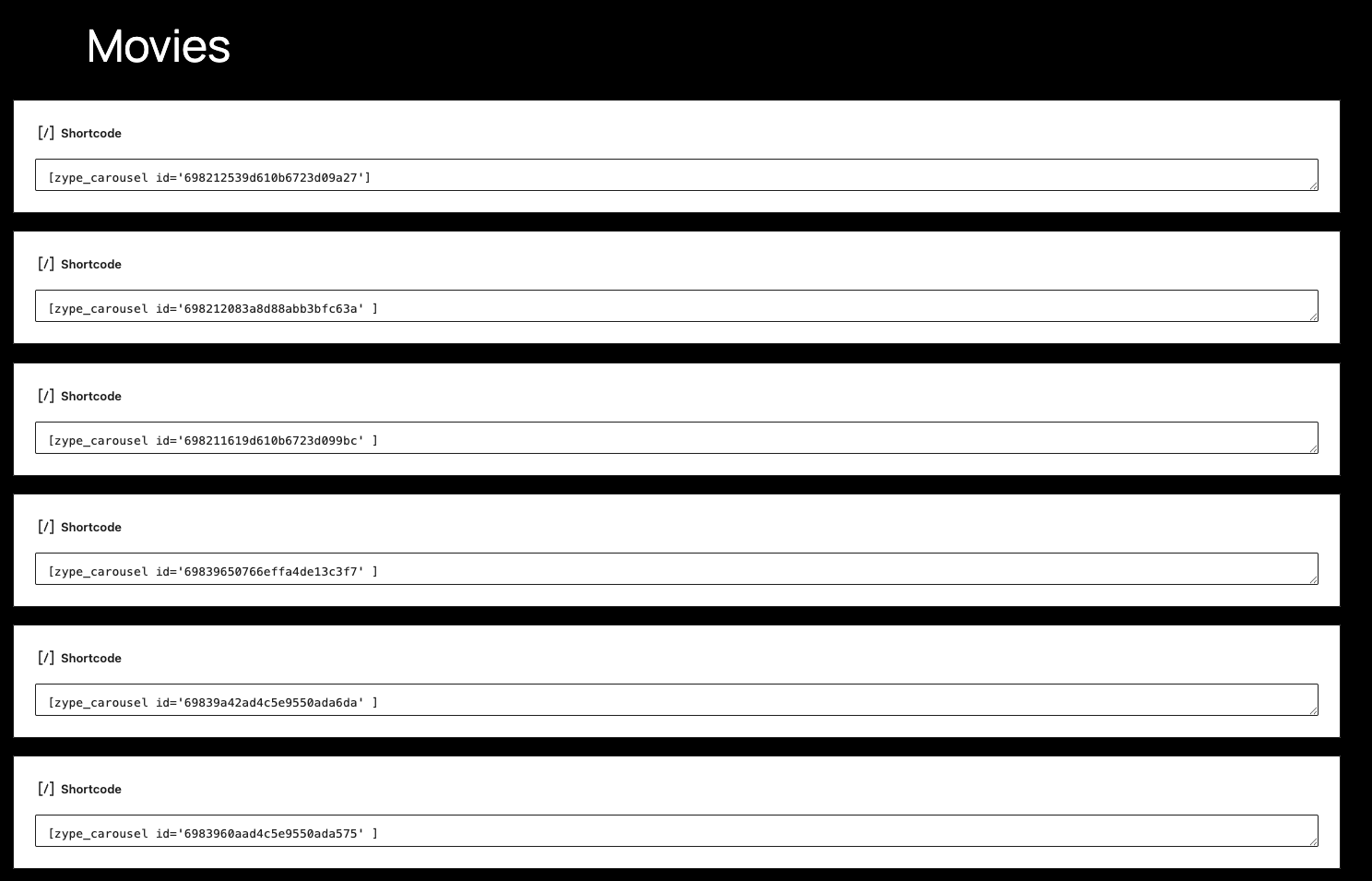
The current shortcode system supports experiences such as:
- Individual videos
- Playlist galleries
- Browsable video grids
- Horizontal video carousels
- Inline video-detail panels
- Dedicated Video Details pages
- Live and linear Channels
- ZObjects and ZObject collections
- Product cards and in-player Product Placement
- Viewer authentication and registration
- Password recovery
- Subscription and checkout interfaces
- Entitled consumer libraries
- Category-driven collections
- Livestreams
A video can be inserted with:
[zype_video id="VIDEO_ID"]
A playlist can be placed in a page with:
[zype_playlist id="PLAYLIST_ID"]
A horizontal carousel can be created with:
[zype_carousel id="PLAYLIST_ID"]
Editors can choose how playlist, grid, and carousel selections open. The default inline mode reveals a player-and-metadata panel beneath the selected row while keeping the surrounding collection visible:
[zype_playlist id="PLAYLIST_ID" view="inline"]
Using view="details" sends the viewer to a dedicated video-detail destination instead.
This gives editorial teams a straightforward publishing workflow while allowing developers to retain control over routing, rendering, templates, player behavior, and front-end assets.
Create Responsive Landscape and Vertical Video Layouts
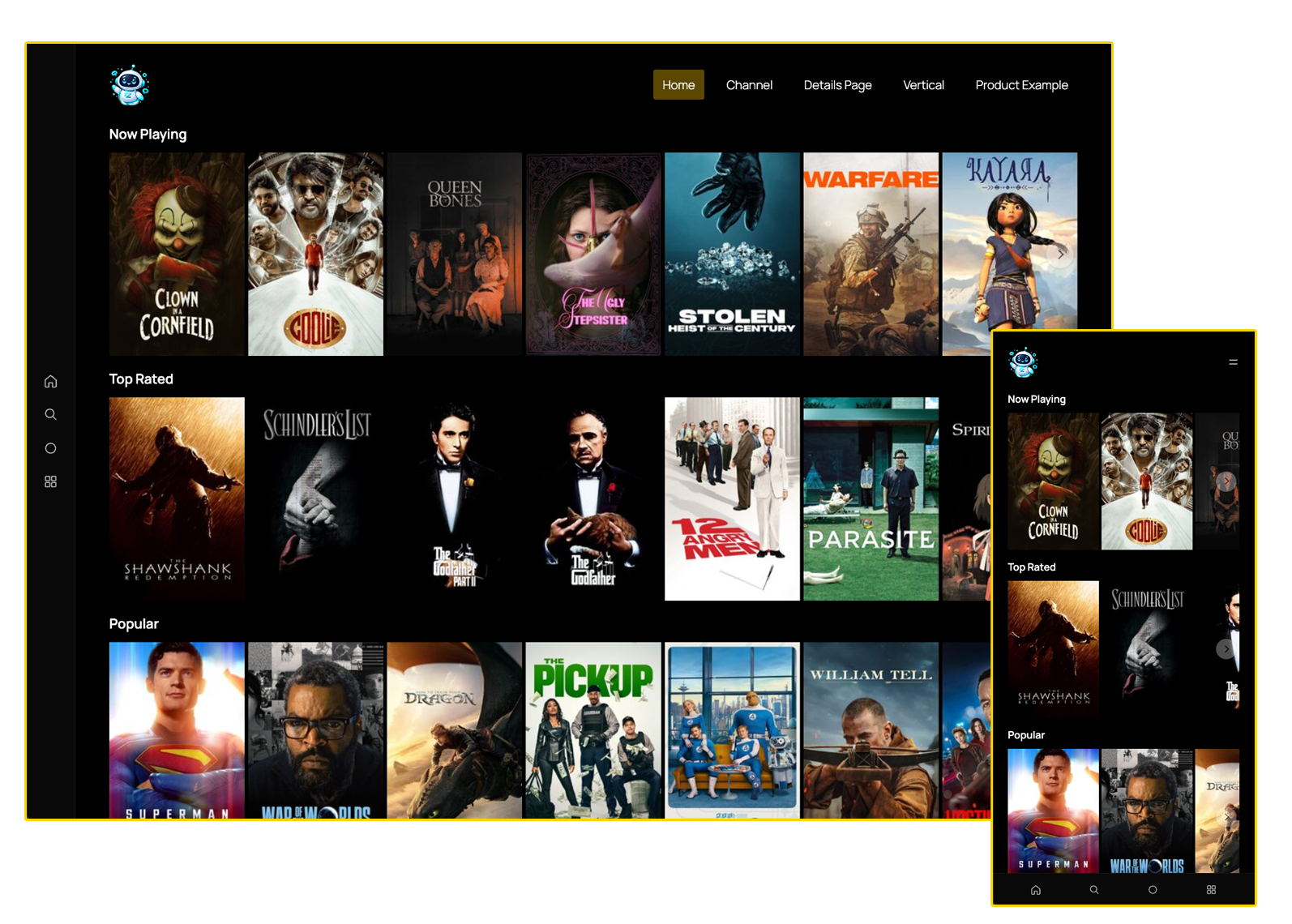
The standard video shortcode can support both traditional landscape, responsive view and opt-in vertical presentation.
Landscape is default:
A vertical experience can be enabled with:
[zype_video id="VIDEO_ID" vertical="true"]
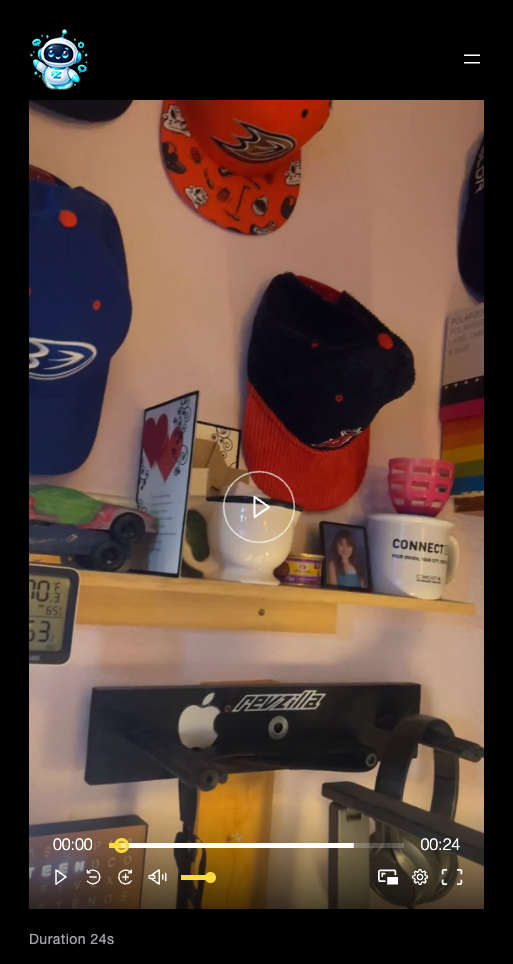
When the attribute is omitted, the regular landscape presentation remains unchanged. Vertical rendering is scoped to the shortcode instance and uses a responsive 9:16 player area rather than applying global layout changes to the site.
This is useful for short-form programming, mobile-first editorial experiences, social-style video destinations, and catalogs that combine multiple video formats.
Vertical video can also participate in the plugin’s broader rendering and Product Placement architecture rather than requiring a separate shortcode or isolated player implementation.
Centralize Viewer Journeys With System Routes
A streaming destination often includes more than video pages. It may also need login, logout, profile, device-linking, subscription, checkout, password-management, rental, pass, and purchase destinations.
The plugin now manages these consumer-facing destinations through a centralized system-route architecture.
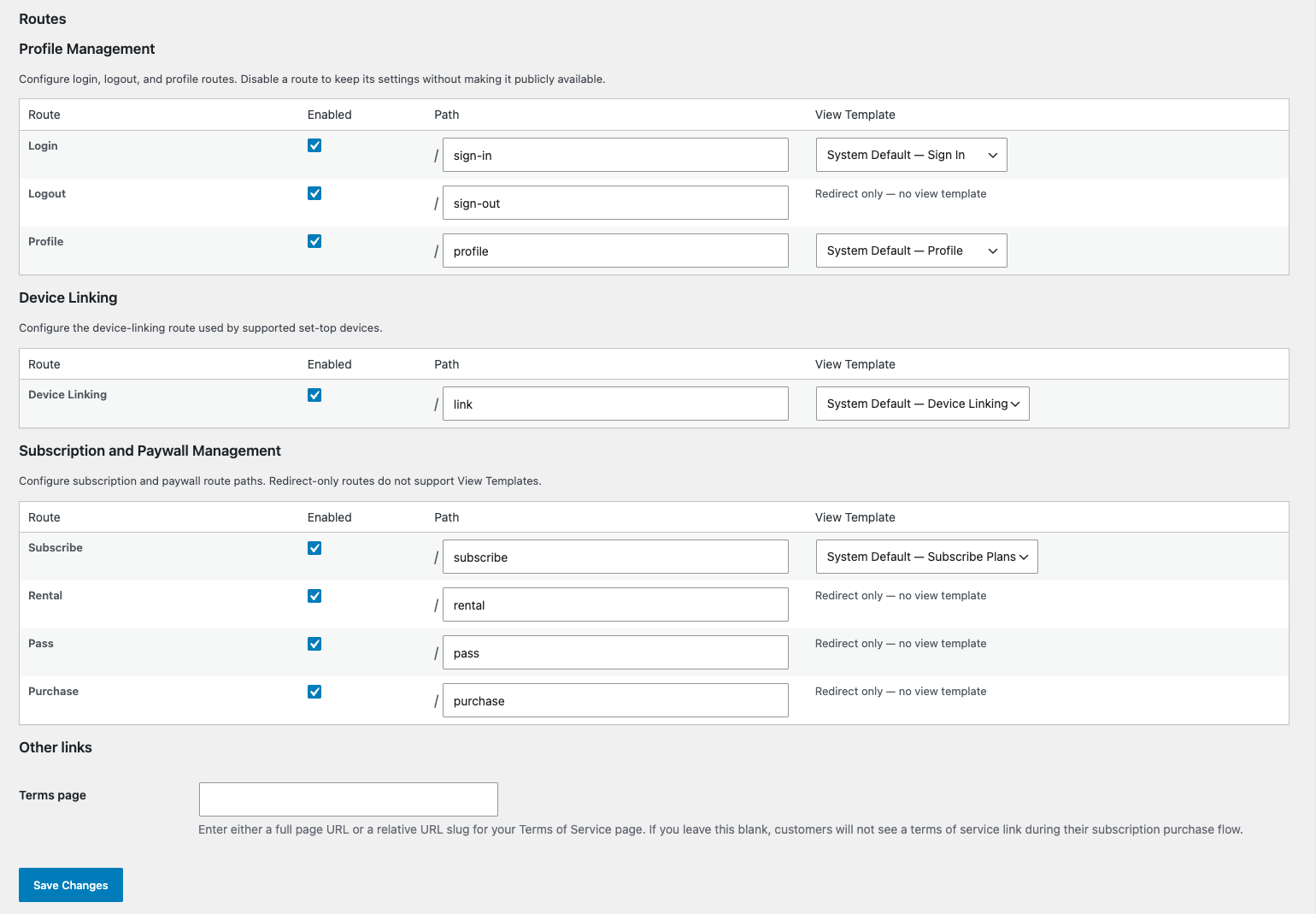
Instead of allowing forms, menus, templates, redirects, and transactional emails to construct URLs independently, the plugin uses a canonical route registry and URL resolver. Administrators can configure public paths under the Routes settings area, while the plugin remains responsible for determining whether each destination is enabled, publicly available, authenticated, anonymous, or dependent on another feature.
This architecture supports routes such as:
- Login and logout
- Consumer profile
- Change password
- Device linking
- Subscription plans
- Checkout
- Subscription management
- Payment-method updates
- Rental, pass, and purchase destinations
- Password-reset handling
Disabled routes are not registered publicly, and URL helpers return no destination when a route is unavailable. This helps prevent broken links, empty form actions, placeholder URLs, and navigation entries that lead to disabled services.
Child routes inherit the availability of their parent. Checkout, for example, remains connected to the Subscribe route rather than operating as an unrelated destination.
The routing system also supports a public, read-only API for compatible WordPress themes. A theme can store a durable system-route identifier and resolve the current URL at render time instead of saving a hardcoded path. If an administrator later changes /profile/ to /my-account/, compatible navigation can continue pointing to the correct destination without rebuilding the menu manually.
The public API intentionally exposes only safe, navigable route information. Internal handlers, submit endpoints, tokenized password-reset URLs, template IDs, raw path fragments, and secrets remain private.
Publish Friendly Video Details URLs
The plugin also supports Dynamic Video Details routes for publishers that want dedicated public destinations based on a video’s Zype friendly_title.
Administrators can configure one or more base paths, such as:
videos
watch
library/video
A video with the friendly_title value featured-documentary could then resolve to:
https://example.com/videos/featured-documentary/
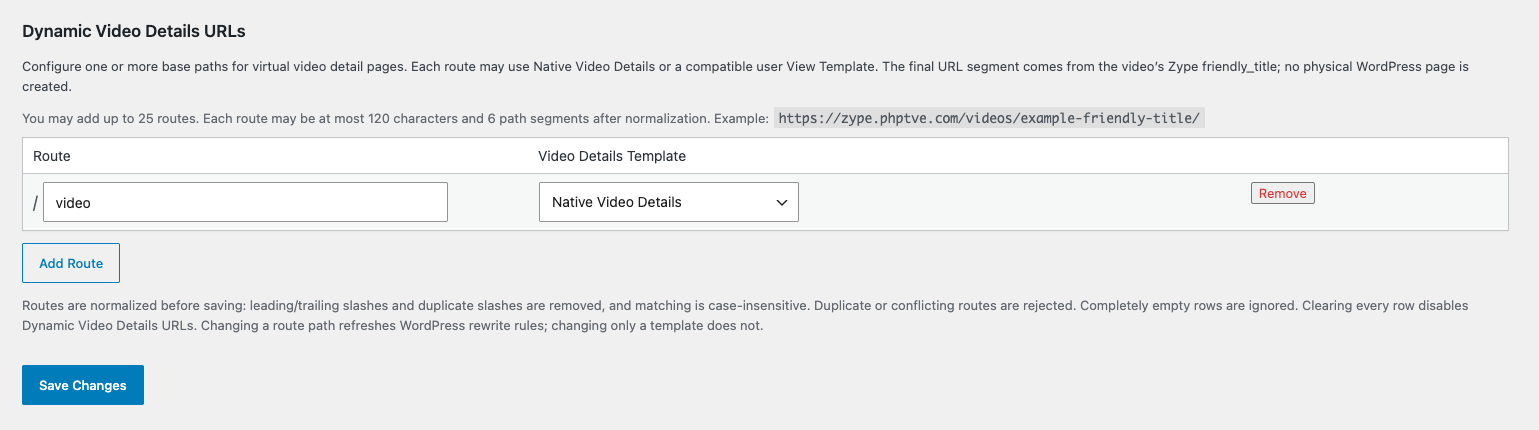
No physical WordPress page or post is created for each video. The plugin resolves the final path segment against the Zype catalog and creates a request-scoped virtual page when exactly one active video matches.
Each configured base route can use the native Video Details renderer or a compatible enabled user View Template. An empty template assignment intentionally means native rendering; it is not treated as a missing configuration.
Ambiguous, missing, invalid, or failed video lookups return the WordPress theme’s normal 404 experience rather than displaying an empty player or partial page.
Customize Presentation With Native-First View Templates
Different publishers have different presentation requirements. A documentary destination may emphasize long descriptions, credits, and related metadata. A mobile entertainment brand may favor compact interfaces, vertical players, and fast content discovery. A commerce-oriented experience may need product information alongside playback.
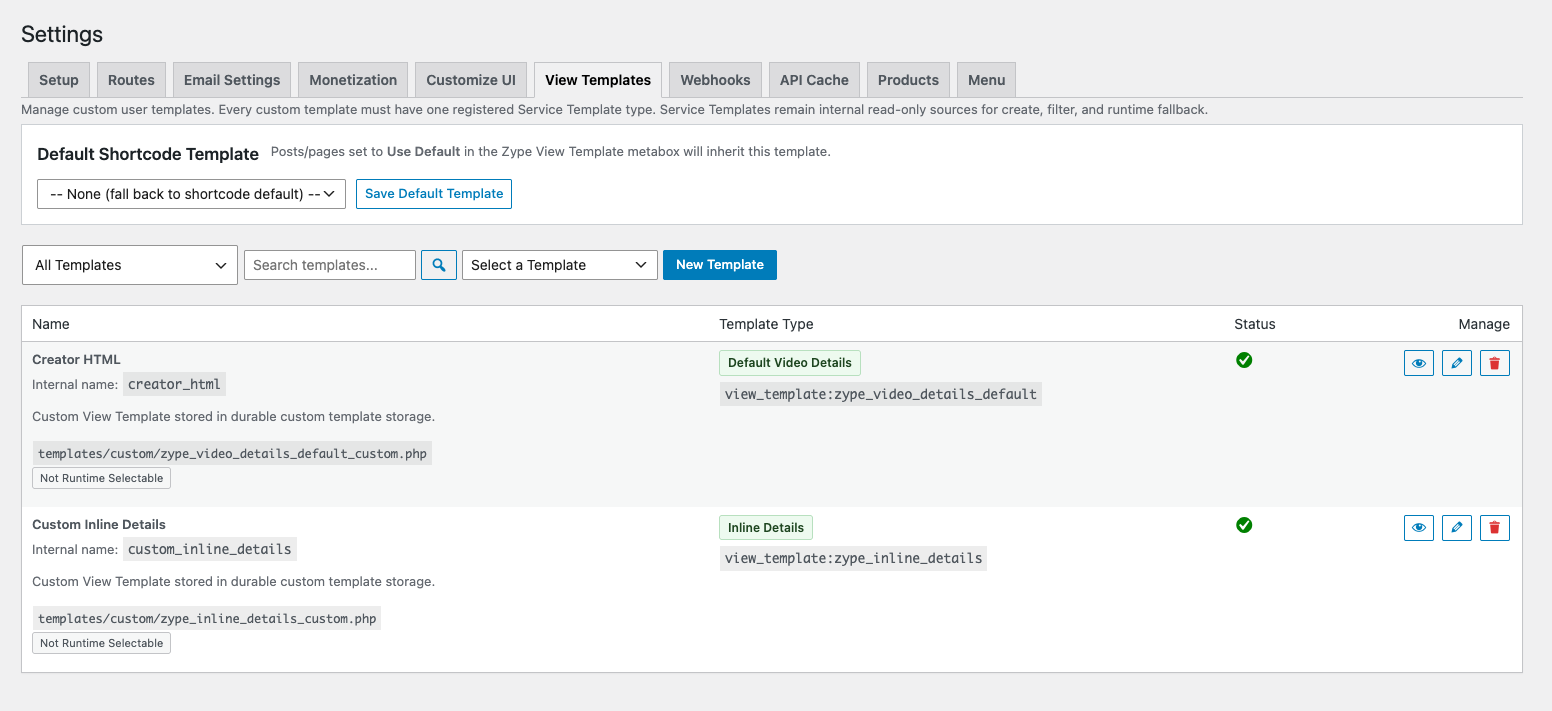
The plugin’s enhanced View Template system gives authorized administrators and developers a structured way to customize those experiences without making the public site dependent on a custom file.
The central principle is native-first rendering:
Shortcode or system route
→ determine the rendering context
→ resolve an explicit compatible user template
→ otherwise use the native PHP renderer
→ return to native output if custom rendering fails
Registered service templates act as trusted starting points that can be copied into a custom template and edited. They are not silently executed as public defaults. User-created templates have their own durable metadata, type, context, enabled state, identity, and file mapping.
Template contexts help prevent a layout intended for one experience from being applied incorrectly to another. Current contexts cover experiences such as: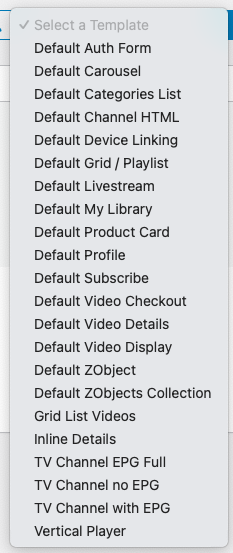
- Videos
- Video Details
- Playlists and grids
- Carousels
- Inline details
- Products
- ZObjects
- ZObject collections
- Categories
- Authentication
- Subscription interfaces
- Consumer libraries
- Profile pages
- Device linking
- Livestreams
- Channel-related presentation shells
Template selection can occur through supported global defaults, route assignments, page assignments, or shortcode attributes, depending on the rendering context.
When a selected template is missing, disabled, incompatible, invalid, or fails while rendering, partial output is discarded and the plugin falls back to the native presentation. Administrators may receive a sanitized diagnostic explaining why the fallback occurred, while public viewers do not see internal identifiers, stack traces, credentials, or filesystem paths.
Direct file browsing and the older Native View registry model are no longer part of the current template-management experience.
Build Data-Driven Layouts With Template Macros
The View Template system also supports an HTML and macro layer for approved rendering contexts.
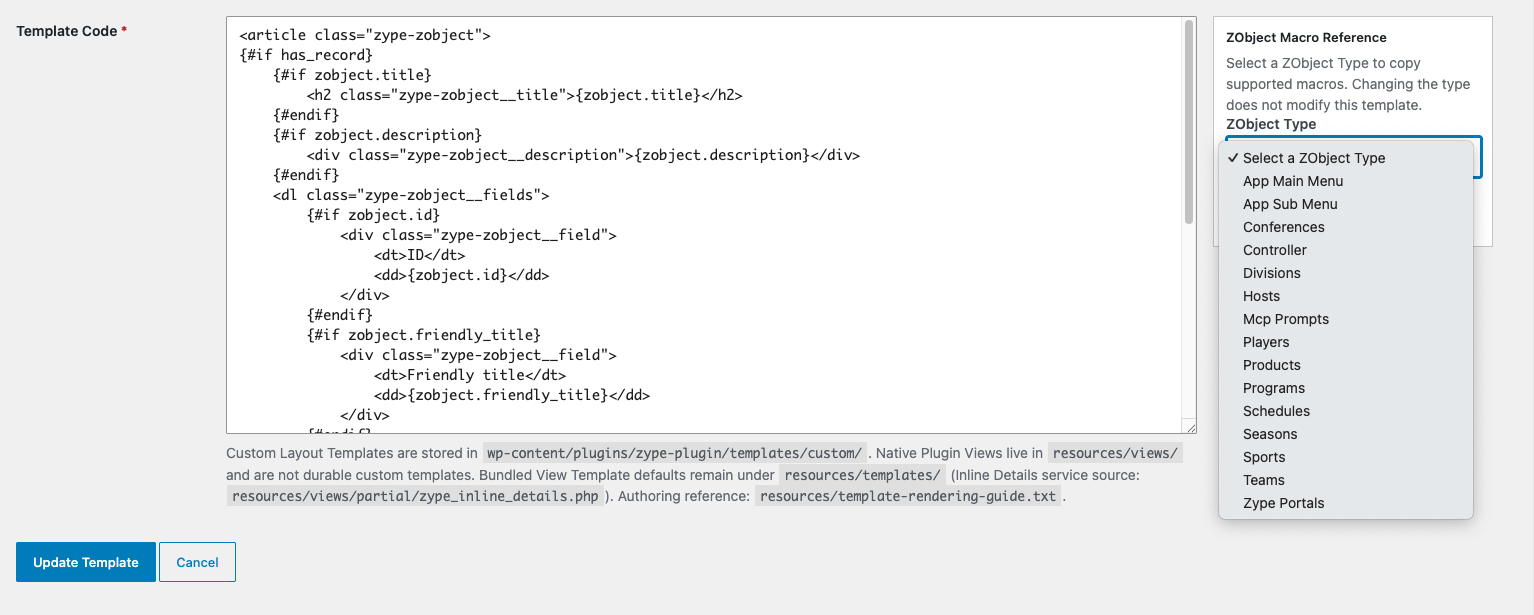
Rather than requiring template authors to work directly with inconsistent API response structures, the plugin can provide normalized, display-safe data through macros.
Depending on the context, templates can use values such as:
{product.title}
{zobject.title}
{teams.title}
{@url:teams.website_url}
The macro system supports conditional sections, collection iteration, escaped text, safe URLs, selected attributes, and narrowly scoped trusted components.
For example, a ZObject collection template can iterate over records using a qualified namespace:
{#each items as teams}<h3>{teams.title}</h3>
{#endeach}
Macro output is escaped according to its context. Unsafe URL protocols are rejected, sensitive properties are excluded, and failed custom templates return to the native renderer.
The system deliberately avoids acting as a general-purpose PHP or shortcode engine. It is designed to expose a controlled presentation layer rather than arbitrary application execution.
Bring ZObjects Into Public WordPress Pages
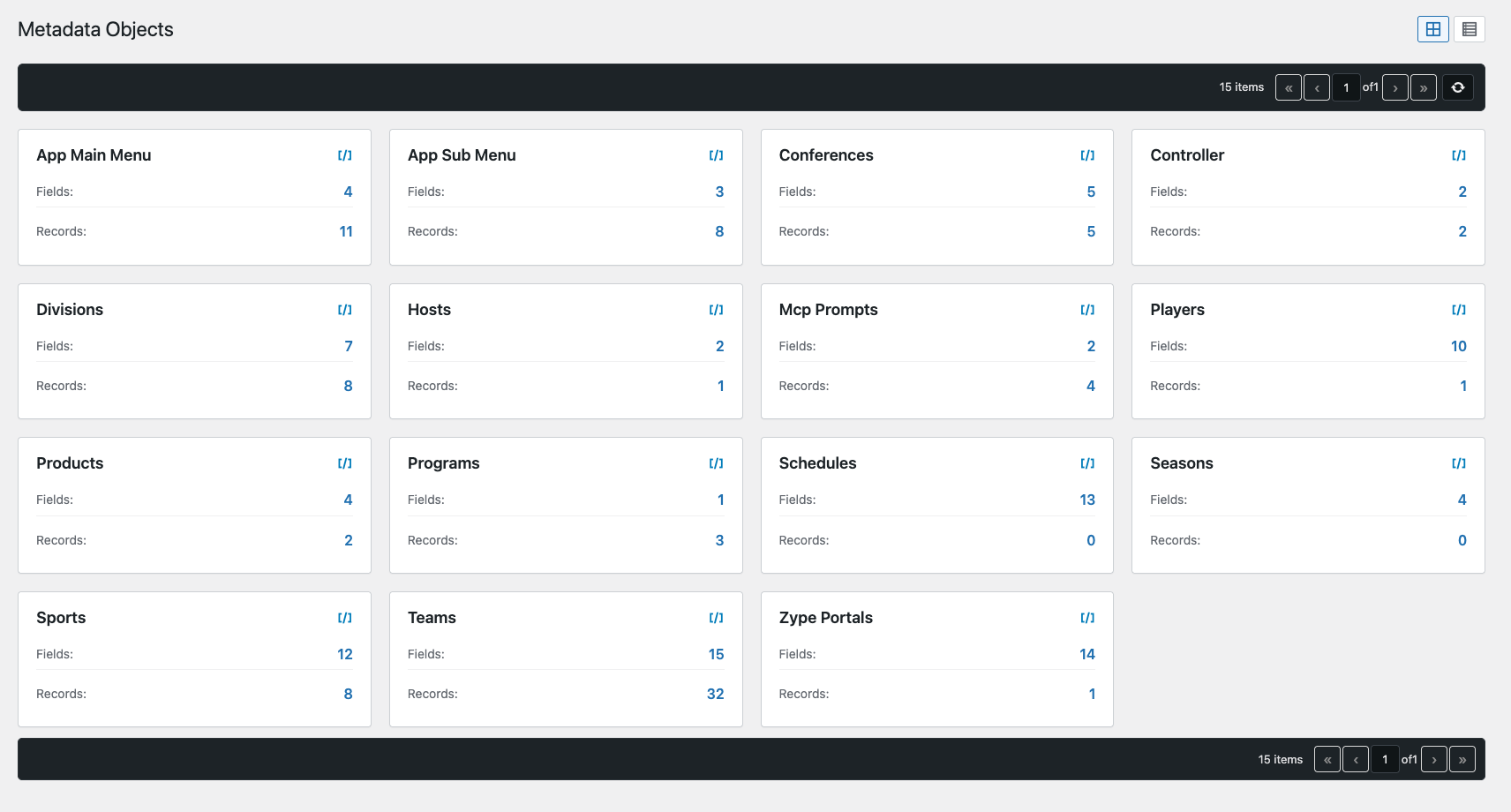
ZObjects are structured metadata records managed in Zype. They can represent people, products, sponsors, schedules, contributors, franchises, program information, supplemental editorial records, or other organization-specific data models.
The plugin’s Metadata Objects administration area lets authorized users browse ZObject Types and their records, switch between tile and list views, inspect available fields, copy shortcodes, paginate larger collections, toggle active status, and delete records where permitted.
ZObject Types use durable Zype identifiers rather than relying only on display names. Administrative mutations require the appropriate WordPress capability, nonce validation, and Zype Admin credentials, while list operations use read-only credentials.
ZObjects can also be rendered publicly with the [zype_zobject] shortcode.
A collection can be placed with:
[zype_zobject type="teams"]
A single record can be selected with:
[zype_zobject type="teams" id="ZOBJECT_ID"]
A compatible custom template can be applied when needed:
[zype_zobject type="teams" id="ZOBJECT_ID" template="team-detail"]
Single records and collections have separate template contexts so their layouts can be designed appropriately. If no custom template is selected, the shortcode uses native rendering.
ZObject fields are normalized before entering the template system. Sensitive properties are filtered using explicit policies, while legitimate metadata fields are preserved. Zype remains the source of truth; the records are not copied into WordPress custom post types.
Create Interactive Product Placement Experiences
For media organizations already using WordPress, launching a more capable video destination should not require abandoning the publishing tools their teams know.
The Zype WordPress plugin connects those existing workflows to the infrastructure needed to manage, publish, secure, and monetize streaming content. Whether you are building a curated video library, a subscriber-supported destination, a live event site, or a branded channel experience, the plugin provides a practical starting point for bringing Zype-powered video to WordPress.
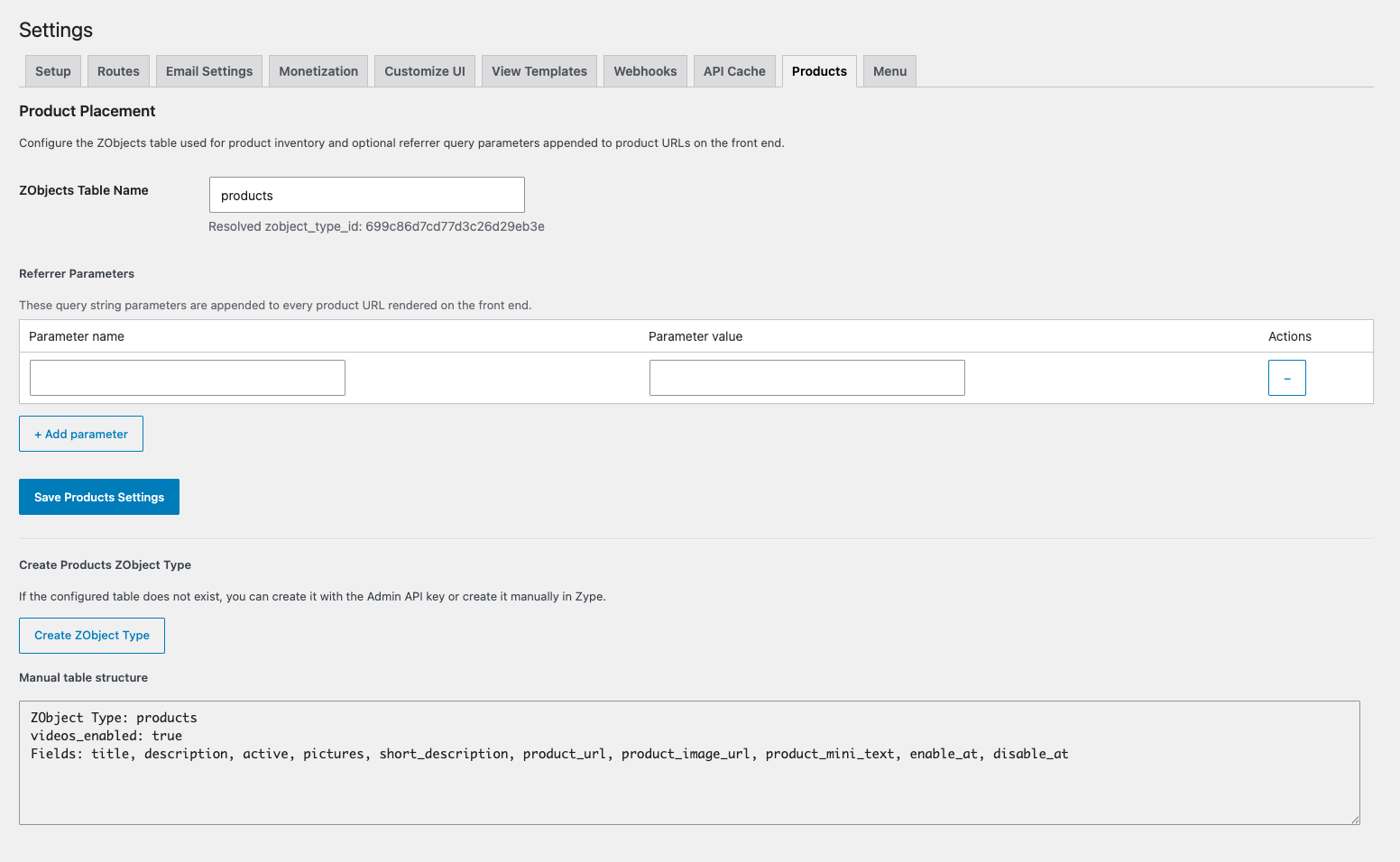
Publishers can maintain a product inventory through the Products administration area, associate products with videos, define when they should appear, choose their position, and select how the placement should be displayed.
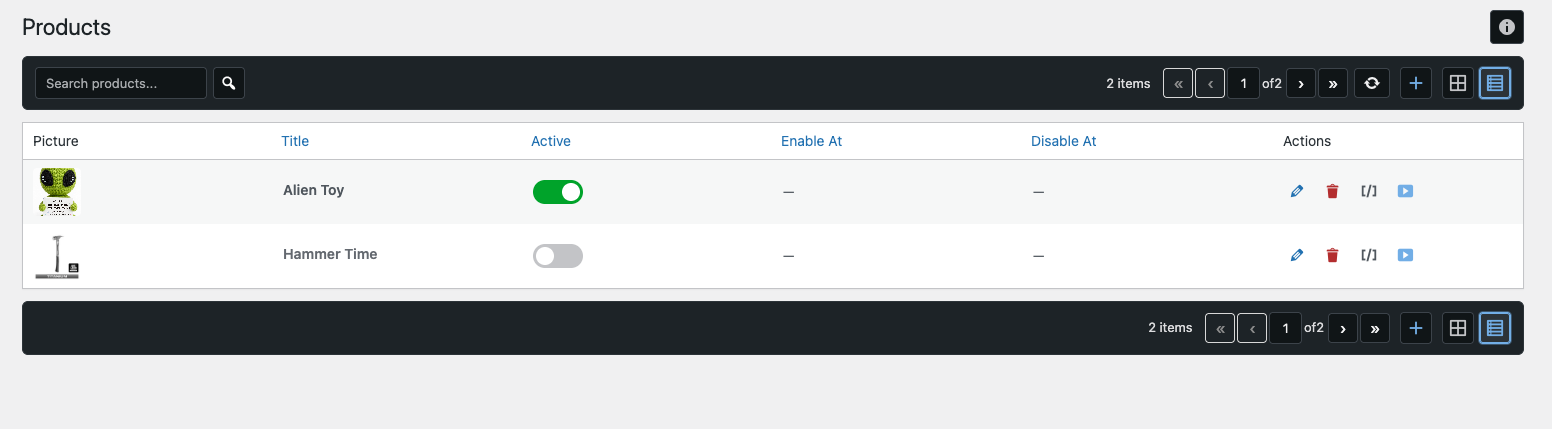
Product records can be managed via the Zype Plugin
Product Placement is enabled for an individual video with:
[zype_video id="VIDEO_ID" products="true"]
When enabled and properly configured, the video experience can include:
- Timed mini product overlays
- Expanded product overlays
- Pause-state product units
- Product images and titles
- Short descriptions
- Clickable product destinations
- Locally generated QR codes
- Product markers along the playback timeline
- Clickable chapter navigation
- Configurable overlay positions
- Responsive behavior on smaller screens
Product segments are associated with exact playback windows. Editorial chapter segments can also be included, while product-only segments are excluded from the chapter list so product markers are not incorrectly presented as program chapters.
Product and segment data are resolved on the server. Only display-safe fields are passed to the browser. Product URLs are validated, configured referral parameters can be appended safely, and QR codes are generated locally by the plugin rather than sending product destinations to an external QR service.
Product Placement wraps the normal video output instead of replacing it. Native video layouts, compatible custom View Templates, and vertical video can render first, after which the product experience is added around the player.
If the feature is omitted, disabled, incorrectly configured, or has no applicable segments, the standard video player remains unchanged.
Publishers can also render a standalone product card with:
[zype_product id="PRODUCT_ZOBJECT_ID"]
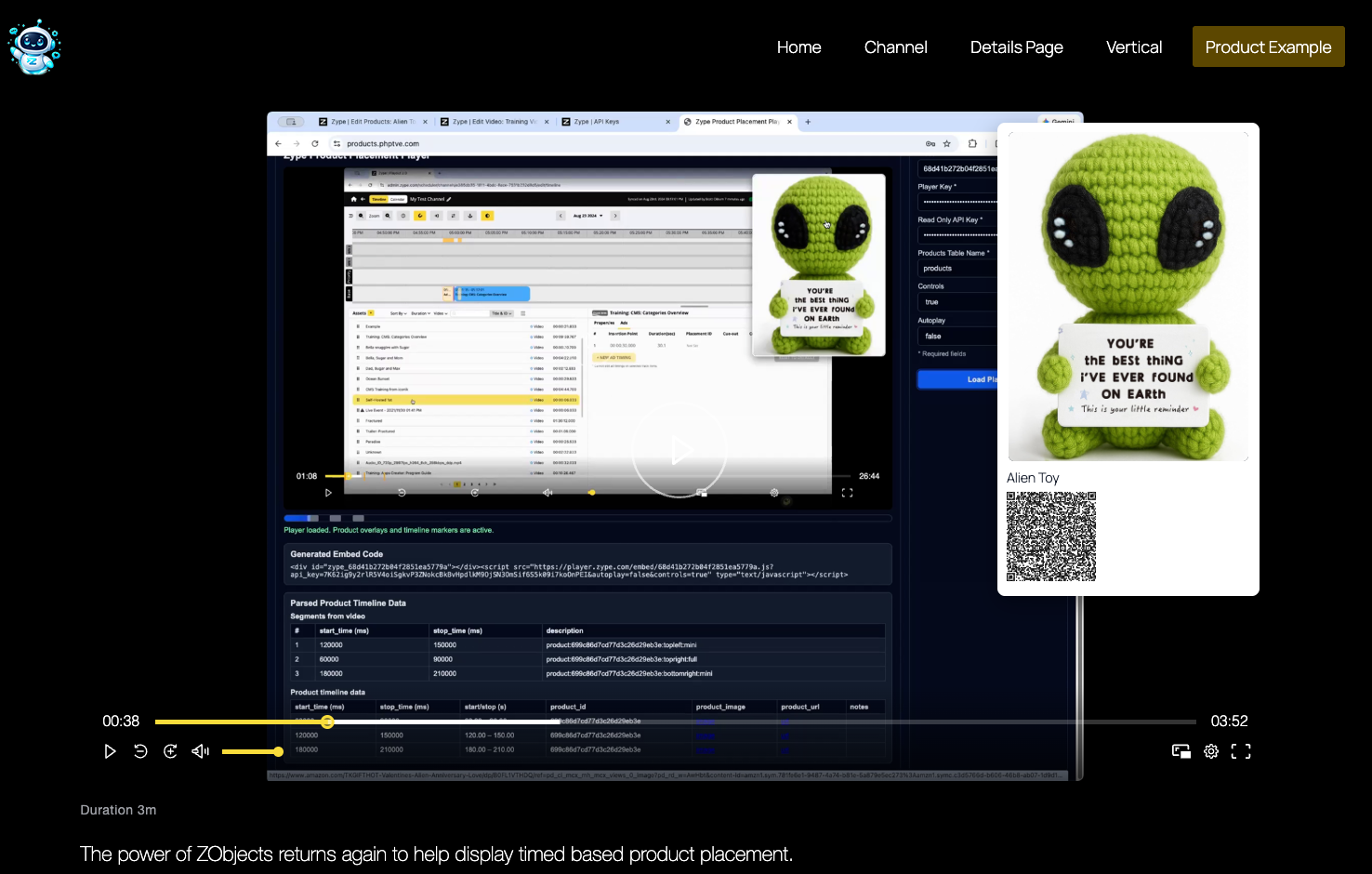
The plugin does not attempt to replace an ecommerce platform. Product Placement does not provide a shopping cart, stock management, order fulfillment, or product payment processing. It is designed for shoppable programming, sponsor integrations, affiliate destinations, contextual calls to action, featured merchandise, and product discovery during playback.
Improve Content Discovery With Grids, Carousels, and Inline Details
The plugin provides several ways to present larger catalogs.
Playlist and grid shortcodes can render browsable video collections, while the carousel shortcode creates a horizontally scrollable row with independent controls and responsive card sizing.
The shared view setting lets publishers choose between two navigation models:
-
view="inline" opens a player and metadata panel beneath the selected collection row.
-
view="details" sends the viewer to the dedicated video-details experience.
Inline details are designed as progressive enhancement. Standard and modified browser clicks can still use the underlying details link, while the enhanced interaction loads the panel without changing the browser URL or creating unnecessary history entries.
Each shortcode instance owns its own panel state, player lifecycle, and controls. Multiple collections on the same page can therefore operate independently.
The native inline layout places the player beside the video title, duration, publication date, description, action controls, and Video Details link on larger screens, then stacks the content responsively on smaller screens.
Custom Inline Details templates can be created from the registered starter. When no compatible user template is selected, the plugin uses the native PHP partial directly rather than running the macro engine.
Deliver More Discoverable, Stable Video Cards
Native playlist, grid, and carousel cards use semantic image markup for thumbnails instead of relying entirely on CSS background images.
This lets browsers discover images earlier and select appropriate responsive sources when the Zype API provides multiple candidates.
Landscape artwork is presented in a stable 16:9 frame, while poster artwork uses a 2:3 frame. Intrinsic width and height values, CSS aspect-ratio, and object-fit help keep cards consistently sized as images load.
Below-the-fold images can remain lazy or deferred, while selected priority images can be promoted when appropriate.
These changes are designed to improve image discovery, reduce unnecessary transfer, and limit layout movement. They should not be interpreted as a guaranteed or universally measured Core Web Vitals improvement, because performance still depends on the active theme, page composition, hosting environment, content, and third-party services.
Custom user templates remain under the template author’s control and are not automatically rewritten to use the native card helpers.
Load Front-End Assets Only Where They Are Needed
Earlier WordPress integrations often loaded broad collections of scripts and styles globally, even on pages without a video, carousel, player, checkout form, or authentication interface.
The plugin now uses conditional front-end asset groups. Renderers request only the resources required by the features actually present on the page.
This includes separate ownership for experiences such as:
- Catalog cards
- Carousels
- Inline details
- Video embeds
- Channels
- Authentication
- Subscription interfaces
- Checkout
- Product Placement
The plugin also uses request-local memoization to avoid repeating identical API, template-resolution, and thumbnail-selection work during one page render. An optional persistent API cache can reduce repeated reads across requests for supported data groups such as metadata.
Collection pages retain server-rendered HTML for discovery, accessibility, and resilience, while secondary interaction and enhancement can be deferred until the relevant component approaches the viewport.
These changes create a hybrid delivery model:
Account and consumer interfaces
→ immediate server-rendered output

Playlists, grids, and carousels
→ server-rendered content with deferred enhancement

Video and Channel players
→ stable shells with purpose-built deferred initialization

Custom rendering
→ native-first with optional compatible templates
Repository audits verify reduced initial embed loading and the absence of player credentials in static embed HTML. Broader field performance results should still be measured on the specific production site before making numerical Core Web Vitals claims.
Manage Channels Without Affecting the Rest of the Theme
Publishers can maintain Channel definitions that connect streaming URLs, electronic program guide feeds, player settings, pause overlays, and locally stored configuration.
Channels are rendered with:
[zype_channel id="CHANNEL_ID"]
The current Channel experience uses a plugin-owned native runtime. Its JavaScript and CSS are scoped to the Channel component rather than applying broad selectors to the page.
Electronic program guide interactions are scoped to the current Channel instance. Multiple Channels can appear on one page without sharing global selectors, player mounts, or instance IDs.
The Channel runtime avoids global html and body overflow changes, does not apply global scrollbar styling, and contains the player inside a stable responsive wrapper. Bitmovin integration, where configured, is initialized near the viewport rather than being injected globally.
This isolation helps the Channel player and guide coexist with the active WordPress theme and with other Zype components.
Page-level PHP View Template selection does not replace the native Channel shortcode renderer. Customization is available through the supported Channel presentation layers while the core player and guide remain under the native runtime.
Manage Video Operations From WordPress
The plugin extends beyond front-end publishing by providing operational tools for several areas of a streaming business.
Video and Playlist Discovery
Administrators can browse and search their Zype video and playlist libraries from WordPress. Pagination and server-side sorting make larger catalogs easier to navigate, while copy-ready shortcodes help editors move quickly from discovery to publication.
Authorized users can perform supported video actions, including changing active status and deleting videos, without exposing administrative credentials to the browser.
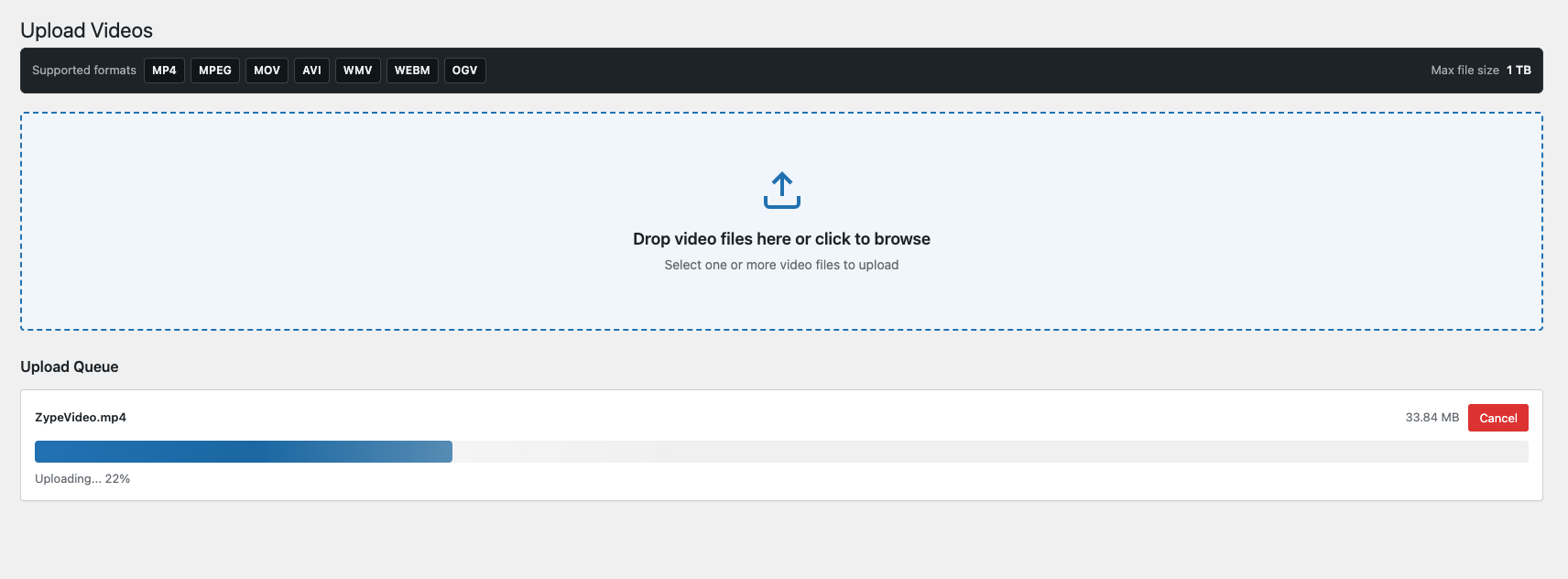
Direct Video Uploads
Video files can be uploaded to Zype from the WordPress administration area.
The plugin supports direct multipart uploads and chunked uploads for larger media files. Editors can enter basic metadata, follow progress, and complete the upload without leaving the website’s administrative environment.
Upload actions require the WordPress upload_files capability, nonce validation, file validation, and server-side Zype credentials.
Metadata Objects
The Metadata Objects area provides access to ZObject Types and their records. Administrators can browse fields, review counts, switch layouts, copy public shortcodes, inspect qualified macros, paginate records, toggle active state, and delete records where authorized.
The general Metadata Objects edit interface remains intentionally limited. Product records use a separate administration experience when product inventory has been configured.
Product Administration
The Products area supports product search, sorting, pagination, list and grid views, product creation and editing, active-state management, deletion, shortcode copying, and video association.
Products can be connected to videos from either the Products area or the Video Search interface, allowing operators to configure timing, position, and display mode without leaving the active workflow.
Cloud Encoders
Technical operators can view and manage Zype cloud encoders through WordPress.
Supported operations include reviewing encoder details, creating and updating configurations, starting or stopping an encoder, and deleting it when appropriate.
Live and Linear Operations
The Live/Linear administration area supports workflows for current live events, past events, event creation, and linear programming.
Authorized operators can start or stop broadcasts, delete supported events, and manage live operations directly from the plugin.
Channel Management
Channel definitions are stored in a plugin-owned WordPress table. Administrators can create, edit, activate, deactivate, and configure Channels with streaming URLs, guide feeds, player settings, and pause-overlay options.
Consumer Management
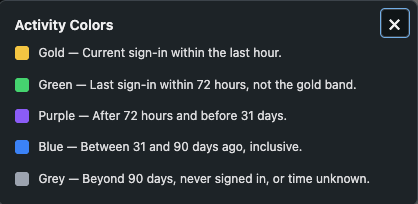
Administrators can search the Zype consumer audience by name or email, sort results, review individual consumer details, and navigate larger consumer lists through paginated administration screens.
Administrators can filter on Activity (when the consumers last logged in).
Support Viewer Accounts and Premium Content
An owned-and-operated streaming destination becomes more valuable when viewers can establish a direct relationship with the publisher.
When consumer authentication is enabled, the plugin can support:
- Registration
- Login and logout
- Profile management
- Change-password flows
- Forgot-password requests
- Password resets
- Device linking
- Entitled consumer libraries
- Subscription plans
- Checkout
- Subscription management
- Payment-method updates
- Subscription cancellation
- Rental, pass, purchase, and paywall experiences
These interfaces are connected to the centralized routing service, which means forms and links resolve through the same canonical availability rules as public navigation.
If a route or submit endpoint is unavailable, the corresponding form does not continue with an empty destination. Checkout and subscription processing are also gated during submission so a mid-flow settings change cannot continue into a provider charge through an unavailable route.
Password recovery has been hardened around the Login route. Forgot password remains a shortcode and asynchronous request flow, while reset pages use an anonymous, Login-gated route.
Support Subscriptions, Transactions, and Entitlements
For premium services, the plugin supports subscription and transaction workflows using configured payment providers.
Publishers can build experiences around:
- Subscription plans
- Video paywalls
- Rentals
- Passes
- Purchases
- Consumer entitlements
- Subscription changes
- Subscription cancellation
- Payment-method updates
Stripe and Braintree configuration is managed through the plugin settings, while secret credentials remain on the server.
Payment, subscription, and authentication assets are loaded conditionally instead of appearing on unrelated public pages.
Transactional email templates can be configured for important viewer events, including new accounts, password resets, rentals, purchases, passes, subscriptions, and cancellations.
Protect Credentials and Administrative Actions
Security is especially important when a WordPress website is connected to video administration, consumer identity, playback, metadata, and payment services.
The Zype WordPress Plugin keeps privileged credentials on the server rather than exposing them in general browser-side configuration.
Administrative and mutation workflows use protections such as:
- WordPress capability checks
- Nonce validation
- Input sanitization
- Contextual output escaping
- Structured errors that avoid secret leakage
- Server-side Zype API requests
- Masked replacement-only credential fields
- Safe URL validation
- Sensitive-field filtering
- Route and feature gating
- Access and entitlement rechecks
- Generic recovery failures
- Sanitized administrator diagnostics
The setup interface treats sensitive credentials as replacement-only values. Saved values remain masked, a blank field preserves the existing credential, and a replacement is stored only when an authorized administrator intentionally supplies one.
Different WordPress capabilities can be used for different operations. General configuration and privileged management require administrative access, while video uploads can be made available to users with the appropriate upload permission.
Product and ZObject payloads expose only approved display fields. Player credentials are not placed in the static page shell. Invalid templates fall back to native output, disabled routes do not emit empty actions, and malformed reset requests fail safely.
These controls reduce avoidable exposure and configuration risk, although they should not be described as a substitute for secure hosting, WordPress maintenance, access-control review, or independent security testing.
Preserve Reliable Public Rendering
The plugin’s current architecture is designed to keep individual configuration problems from disrupting an entire public page.
Examples include:
- Missing custom templates return to native rendering.
- Failed custom output is discarded before fallback.
- Disabled routes resolve as unavailable.
- Missing route URLs are not replaced with
#. - Player failures remain contained within the player mount.
- Multiple embeds share scripts instead of loading duplicates.
- Multiple Channels use isolated selectors and instance identifiers.
- Multiple Product Placement videos use independent containers.
- Request-local caching avoids repeated work without creating stale cross-request state.
- Invalid Dynamic Video Details lookups return a controlled 404.
- Recovery responses do not expose account or token details.
This native-first and fail-safe behavior lets publishers customize their site without making every page dependent on custom code.
Shape the WordPress Administration Experience Around Your Team
Not every WordPress administrator needs access to every streaming operation.
The plugin includes menu controls that let site owners decide which Zype sections appear in the WordPress sidebar. This can create a cleaner workspace for editorial, product, and operational teams by showing the tools they use most frequently.
The core Settings area remains available to authorized administrators, while other sections can be hidden from sidebar navigation as needed. 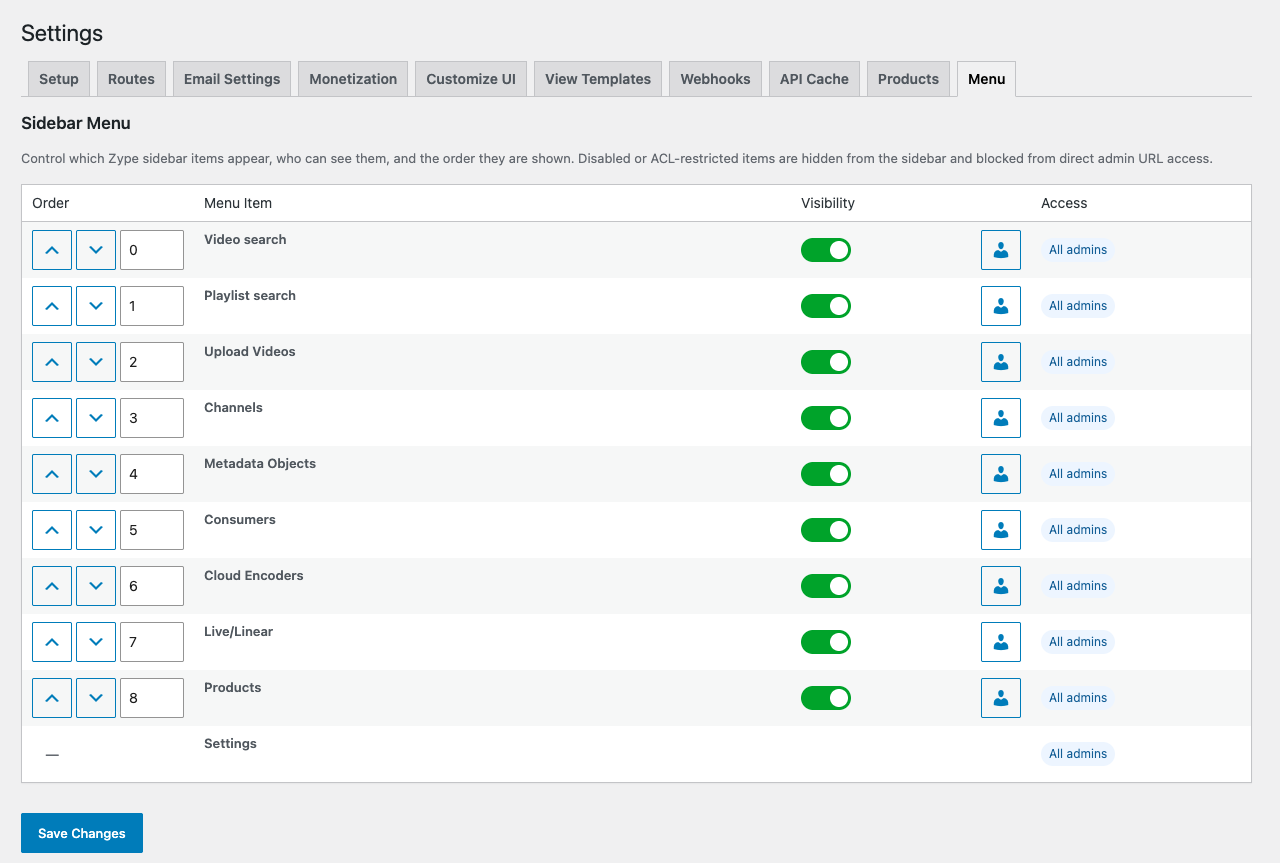
Publishers can also configure front-end color and interface settings so viewer-facing modals, playlists, and related components feel more consistent with the surrounding website.
Settings areas cover API credentials, Routes, email templates, monetization, interface styling, View Templates, webhooks, API caching, Products, menu visibility, player behavior, and consumer features.
Extend Compatible WordPress Themes Through Public APIs
The plugin provides a public integration contract for compatible themes and navigation systems.
Themes can detect whether the route API is available, enumerate eligible routes, retrieve an individual route, and resolve its current canonical URL.
Available helpers include:
zype_system_routes_api_available()
zype_public_system_routes()
zype_public_system_route()
zype_public_system_route_url()
The plugin also provides a route-change action that lets full-page caches, CDN layers, or dependent systems respond when route settings are saved.
This makes it possible for a classic WordPress theme, block theme, or menu integration to bind navigation to durable Zype system-route identifiers without instantiating internal plugin services or storing implementation-specific paths.
Dynamic Video Details routes remain intentionally separate from this public navigation API.
Developers can also extend the viewing experience through typed View Templates, normalized macros, native PHP rendering hooks, shortcode attributes, WordPress actions, filters, and Zype’s API-powered platform.
Build on an API-Connected Streaming Foundation
The Zype WordPress Plugin is designed for publishers that want the flexibility of WordPress without disconnecting their website from the broader streaming workflow.
By connecting WordPress to Zype’s video, audience, monetization, live, metadata, and playback services, the plugin helps teams:
- Reduce repetitive publishing steps
- Keep video operations closer to editorial workflows
- Launch branded video pages without rebuilding core integrations
- Create responsive landscape and vertical experiences
- Present videos through grids, playlists, carousels, and inline details
- Maintain direct relationships with authenticated viewers
- Support free, entitled, subscription, and transactional experiences
- Publish structured ZObject data
- Add timed product discovery to video
- Centralize public account and monetization routes
- Protect sensitive platform credentials
- Load front-end assets more selectively
- Customize presentation while retaining native fallbacks
- Integrate compatible WordPress theme navigation with current route URLs
The plugin acts as a bridge between WordPress publishing and the systems required to operate a modern streaming destination.
Turn Your WordPress Site Into a Streaming Destination
For media organizations already using WordPress, launching a more capable video destination should not require abandoning the publishing tools their teams know.
The Zype WordPress Plugin connects those existing workflows to the infrastructure needed to manage, publish, organize, secure, personalize, and monetize streaming content.
Whether you are building a curated video library, a subscriber-supported destination, a shoppable programming experience, a live event site, a metadata-rich catalog, or a branded linear Channel, the plugin provides a practical foundation for bringing Zype-powered video to WordPress.
Ready to explore what Zype can do for your streaming business? Talk with the Zype team about your content, audience, monetization, product, and distribution goals.
The Zype WordPress Plugin is expected to be available in Q3 2026. Reach out today to see it in action or learn how to participate in beta testing with your Zype account.